
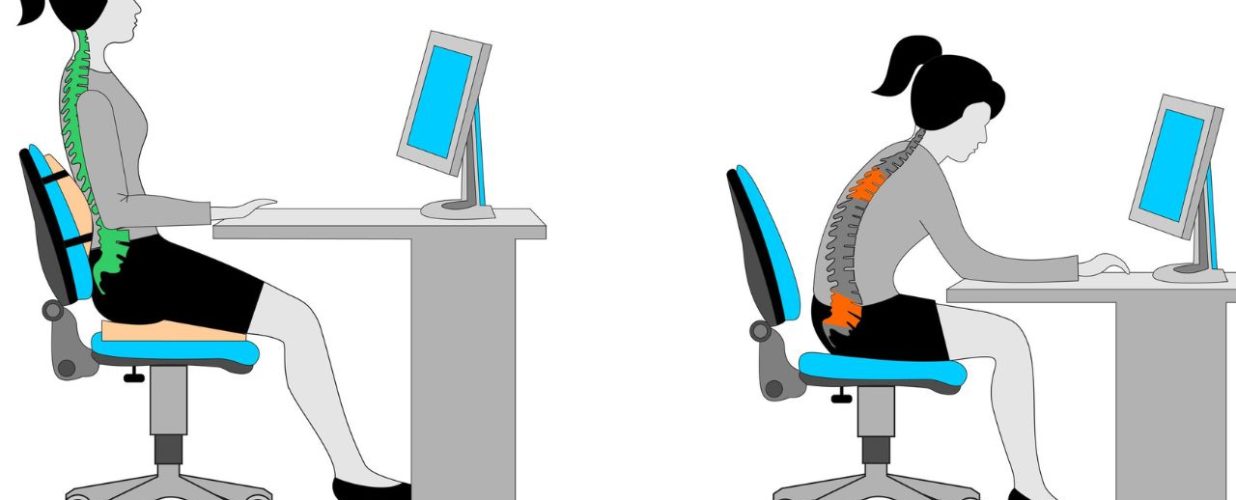

When most people hear “ergonomics,” they picture an expensive office chair or a trendy standing desk. But everyday ergonomics isn’t just about furniture—it’s about how your body interacts with your environment. Every time you sit, stand, type, or even hold your phone, you’re either supporting your spine or putting it under unnecessary stress.
Poor workplace ergonomics often shows up as nagging pain: a stiff neck after a long Zoom meeting, lower back tension after hours at the desk, or sore shoulders from hunching over a laptop. Left unchecked, these habits can turn into long-term issues like spinal misalignments, joint pain, or chronic fatigue.
The truth is, small adjustments throughout the day can have a huge impact on comfort, productivity, and long-term well-being. By understanding the basics of ergonomics for work and building healthier habits, you can protect your spine, boost your energy, and reduce the risk of injuries—all without a complete lifestyle overhaul.
Simple Adjustments for Better Ergonomic Health
The good news is that ergonomic well-being doesn’t require complicated strategies. Often, the simplest office ergonomics tips are the most effective. Here are some that can be applied immediately:
- Raise your screen to eye level. If your monitor or laptop is too low, you’ll constantly tilt your head forward. Over time, this creates neck strain and headaches. Use a monitor stand, stack of books, or adjustable arm to keep your screen in line with your eyes.
- Keep your feet flat on the floor, knees at hip level. Crossing your legs or dangling your feet strains your lower back and hips. A small footrest can help if your chair is too high.
- Support your lower back. Use a lumbar cushion, pillow, or even a rolled-up towel behind your spine. This maintains the natural curve of your lower back and prevents slouching.
- Set up your keyboard and mouse at elbow height. Your elbows should be bent at 90 degrees and close to your body. This prevents shoulder tension and keeps wrists in a neutral position.
- Keep essentials within reach. Constant stretching or twisting to grab items puts extra stress on your spine and shoulders.
These adjustments may seem small, but together they create an ergonomic desk setup that keeps your body aligned and supported.
Take the Next Step Toward Better Posture
Small changes in desk ergonomics can protect your spine, boost your energy, and improve your workday. Don’t wait until discomfort turns into chronic pain—start making healthy workday posture a priority today.
Book a Consultation Today
Why Breaks and Movement Matter
Even with a perfect ergonomic desk setup, the body is designed for movement, not stillness. Sitting or standing too long—even in good posture—eventually wears on muscles and joints.
Why movement matters:
- Prevents muscle fatigue and stiffness
- Improves circulation
- Protects spinal discs from uneven compression
- Boosts mental clarity and reduces stress
Simple strategies:
- Stand up and stretch every 30–60 minutes
- Walk for a few minutes between tasks
- Do “micro-breaks” like shoulder rolls or gentle twists at your desk
- Alternate between sitting and standing
Think of these not as wasted time, but as investments in your productivity and long-term health.
Practical Ergonomic Tips You Can Use Today
Beyond the basics, a few extra workplace ergonomics strategies can keep you aligned, energized, and pain-free:
- Check your posture regularly. Shoulders back, chin tucked, spine tall. Posture awareness is half the battle.
- Adjust lighting. Poor lighting makes you lean forward or squint. Proper lighting prevents eye strain and awkward positioning.
- Use a headset. Avoid holding your phone between your shoulder and ear—a classic trigger for neck and upper back pain.
- Stretch daily. Focus on the neck, shoulders, hips, and lower back. Even five minutes of stretching can reset tight muscles.
- Pair furniture with habits. An ergonomic chair or desk is helpful, but only if paired with awareness and movement breaks.
And when discomfort persists despite your best efforts, consulting a chiropractor who specializes in spinal biomechanics can be invaluable. A professional can identify misalignments, recommend personalized adjustments, and guide you toward long-term spinal health.
Final Thoughts
Everyday ergonomics isn’t about perfection—it’s about small, intentional changes that support your body every day. Whether you’re adjusting your monitor, taking a quick walk, or checking posture, each choice moves you closer to better alignment, less pain, and more energy.
On a personal note, I’ve seen countless patients transform their workdays by applying just a few of these office ergonomics tips. What starts as minor tweaks often becomes life-changing habits. For me, ergonomics isn’t just professional advice—it’s a daily practice that keeps me energized, focused, and aligned. And when your body feels supported, everything else—productivity, mood, and quality of life—improves too.